CLOUD PLAYOUT

Cloud playout software, the master control room in a browser tab.

Playout, graphics, ad cues, and encoding run in the cloud for every channel. You build the schedule; the engine keeps it on air around the clock and delivers it to every screen.

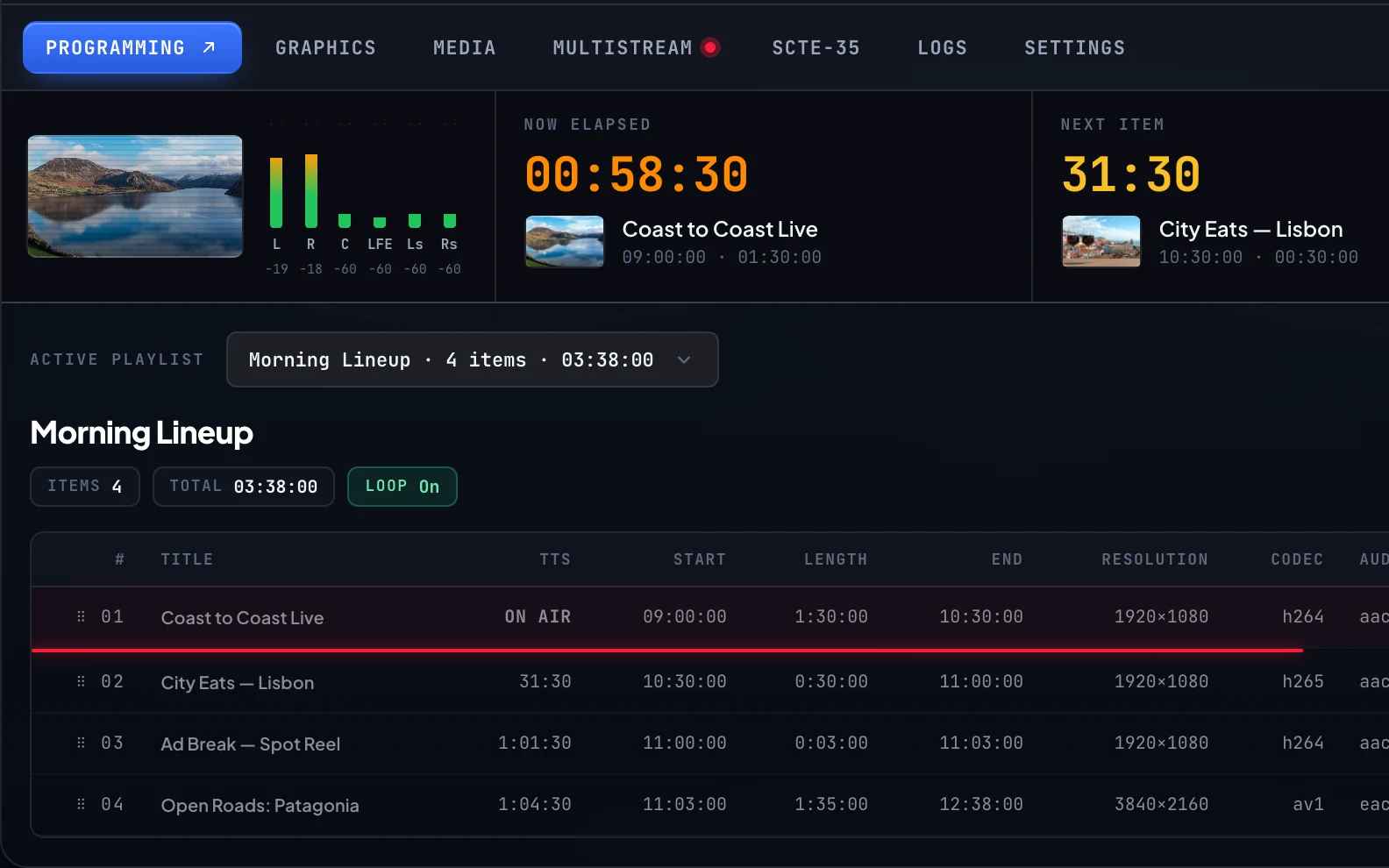
The LIVEPLUSTV cloud playout console with a channel on air
The engine

What cloud playout does, end to end

Four jobs, running continuously for each channel. Together they are what a master control room used to be.

  1. Plays the schedule

    The weekly grid airs exactly as built: recurring blocks, loops, auto-fill, and live slots. Changes go to air without a render step, and gaps never make it to screen.

  2. Renders the graphics

    Logo bug, lower thirds, ticker, and clock are burned into the picture server-side, so the channel looks the same on a smart TV as it does in VLC.

  3. Cues the breaks

    SCTE-35 markers ride the stream frame-accurately, placed in the schedule or passed through from a live feed. Channels that run no ads simply place no markers.

  4. Encodes and delivers

    Each channel is encoded at several quality levels and handed to our delivery network serving 300+ cities with unlimited bandwidth. Every viewer gets the best picture their connection can carry.

Graphics

Broadcast graphics, the whole kit.

Every graphic is rendered into the picture server-side, so what you approve is what every player shows, from smart TVs to VLC. The viewer’s device only has to decode video.

Identity

Logo bug and clock

Keep the channel mark on screen with an optional broadcast clock beside it. It rides every show, scheduled or live, and it is how viewers know they are home.

Lower thirds

Names, titles, straps

Speaker names, show titles, verse references, breaking straps. Styled once to your look, then triggered whenever they are needed.

Ticker

A ticker that keeps moving

Run headlines, announcements, or scores across the bottom of the picture, and update the text without touching the stream.

Languages

Multi-script and RTL text

Arabic, Urdu, and Hindi render correctly out of the box, right-to-left included, and you can upload your own fonts so on-screen text stays true to your script and brand.

Per item

Graphics tied to shows

Attach graphics to individual playlist items, so a sponsor bug airs only during the sponsored show and drops when it ends. Per-item crossfades carry one show cleanly into the next.

Live

Triggered from the control room

Fire lower thirds, tickers, and overlays while you are live, from the same console that runs the schedule. No separate graphics operator seat required.

PROGRAMMELOGO + CLOCKLOWER THIRDTICKERRENDERERburned in, server-sideEVERY PLAYERsame picture
Four layers in, one picture out · not a player feature
The numbers

Codecs, audio, and transport.

The format story is deliberately boring: maximum compatibility on every plan, efficiency options when a channel grows into them. The plan-by-plan mapping is on the Cloud Playout pricing table.

Video

H.264 everywhere, up from there

Every plan encodes H.264, the codec effectively every device decodes. Higher plans add HEVC and AV1 for more picture per megabit, with adaptive ladders from 1080p30 up to 4K on Studio.

Audio

AAC, with surround on top

AAC stereo on every plan, the universal choice for HLS delivery. Studio adds 5.1 surround for channels where the mix matters.

In and out

Broadcast in, HLS out

Contribution over RTMP, SRT, or RIST, in push or listener mode. Out the other side: HLS in 2-second segments over a 300+ city edge network, with SCTE-35 cues riding end to end.

AI

AI where it saves real work.

No chat box bolted on the side. The AI features run inside the workflow: tagging media at upload, subtitling your programming, and translating when a channel needs a second language. Tagging and subtitles come in from the FAST plan; translate and dub arrive with Studio.

Tagging

Content tagged at upload

Shows get genre, rating, and category labels as they land in the library. The same labels drive the programme guide, make a deep archive searchable, and ride ad requests as brand-safety signals.

Subtitles

Subtitles without a transcriber

Automatic subtitles are generated for your programming, so viewers watching muted on a phone and viewers who are hard of hearing both stay in the audience.

Languages

Translate and dub

Studio channels can translate programming and generate dubbed audio, so one library can serve a second-language audience without a second production.

Scheduling

Weeks of grid from the library

Ask for thirty days of programming and get a grid that respects programme lengths, keeps repeats apart, holds genre balance across dayparts, places the ad breaks and fills the guide. Then edit it like any schedule. How AI scheduling works.

Operations

Run it like a control room.

The parts of a master control room that matter at 3 a.m., in the same browser tab as the schedule.

Alerts

Told before your viewers are

The console alerts you when an encoder restarts, an output disconnects, a gap opens in the schedule, an item is missed, the picture freezes, or a live input starts and ends. The same alerts go out by email, and by webhook to Slack, PagerDuty or your own system. Which alerts you get is a rule you set per channel.

Preview

Program and clean feed, in the browser

Watch the program output as it goes to air, or the clean feed without graphics, from the console with near real-time delay. No second player, no separate monitoring box.

Loudness

Normalised at upload

Every file is loudness measured and normalised to broadcast levels when it lands in the library, so a loud promo after a quiet sermon is not a thing your viewers ever notice.

Clips

Trim to the frame

Set in and out points on a file to the frame, and place ad markers per airing, without re-uploading or re-encoding the original.

As-run

What aired, to the second

Export what actually played and when, the seconds of drift against the schedule, and every cue that fired, as JSON or CSV. Kept for a year.

Live blocks

On time in, on time out

A scheduled live block switches to your feed at its start and hands back at its end. If the primary feed drops, the channel cuts to your backup input, then to a standby screen if that is gone too, and returns to the primary on its own when it comes back.

In plain terms

Cloud playout software, versus the rack

A traditional playout chain is a stack of purchases: an automation system, a video server, a character generator, an encoder, and someone qualified to keep them talking to each other. It works, which is why broadcasters ran it for decades, and it is why a new channel used to be a six-figure decision before a single show aired.

Cloud playout collapses that stack into a service. The same four jobs run per channel on infrastructure you never touch, the console is a browser tab, and a second channel takes minutes instead of a second rack. Updates land without a maintenance window on your side, and the cost sits on the cloud playout pricing page instead of in a capex request. Compare us against Muvi and Amagi, move a channel off satellite, or start with the guide to what cloud playout is.

LIBRARYshows + schedulePLAYOUTSCTE-35 · graphicsCDN300+ citiesSCREENSweb · mobile · TVone live stream, 24/7
Schedule in, broadcast out

Built to stay on air

The engine assumes something will go wrong at 3am. Schedule gaps auto-fill from the library, a bad file skips to the next item, and a dropped live input falls back to the schedule, rejoining when it recovers. As-run logs record what actually aired, so you can check what happened last night instead of reconstructing it. The grid all of this runs from has its own page, TV scheduling software, and a channel that also has to feed a cable headend is covered under local and cable channels.

Wired for the rest of the platform

The SCTE-35 cues playout carries are the same ones server-side ad insertion fills, the schedule it airs is the same one published as your channel’s programme guide, and every stream it hands to the delivery network is counted in your channel analytics.

EVERY CHANNEL INCLUDES
Questions

Cloud playout, answered.

What is cloud playout software?

Playout is the system that turns a schedule into one continuous broadcast stream: it plays each item at its slotted time, renders graphics into the picture, inserts ad cues, and encodes the result for delivery. Cloud playout runs that whole chain on servers instead of a rack in your building, managed from a browser.

How is this different from OBS or vMix?

OBS and vMix are production tools: someone operates them, live, for the duration of a show. Playout is automation that runs a channel 24/7 from a schedule with nobody at the desk. The two work together, not against each other. Many operators produce the live show in OBS or vMix and send it to the channel as a live input.

Are the graphics really part of the video?

Yes. Every graphic, from the logo bug to the ticker, is rendered into the picture server-side before encoding. There is no overlay layer for a player to drop or a device to render differently. What you approve is what every viewer sees, on every player.

Which codecs and resolutions are supported?

H.264 on every plan, because everything decodes it. Higher plans add HEVC and AV1 for more picture per megabit, adaptive ladders run from 1080p30 up to 4K by plan, and audio is AAC stereo with 5.1 surround available on Studio. The exact mapping is on the pricing page compare table.

What happens when a file is bad or the schedule has a gap?

The channel keeps going. Gaps auto-fill from your library or a standby screen, a file that misbehaves is skipped for the next item, and a dropped live input falls back to the schedule. As-run logs record what actually aired.

Can I run more than one channel?

Yes. Plans are per channel, and each channel runs in its own isolated engine, so a busy sports channel cannot affect the music channel next to it. Operators commonly launch a second channel once the first is earning.

How quickly can a channel launch?

In minutes, once the first file is in. There is no hardware to rack and no software to install: upload the library, build the grid, and start the channel from the browser.

What do the AI features do?

Three jobs today. AI content tagging labels shows with genre, rating, and category at upload, feeding the guide, library search, and the brand-safety signals on ad requests. Automatic subtitles come on every plan. And Studio adds translate and dub for channels serving more than one language.

GET STARTED

Your channel can be live in minutes.

No contract and cancel anytime, with a 7-day money-back guarantee on your first purchase.