GUIDE

What is cloud playout? A plain answer, and what it replaces.

Cloud playout is broadcast automation running on someone else's servers. It takes your schedule, plays each show at its slotted time, renders graphics into the picture, marks the ad breaks, and encodes one continuous stream for delivery. It is the work a rack of hardware used to do, running in a browser tab.

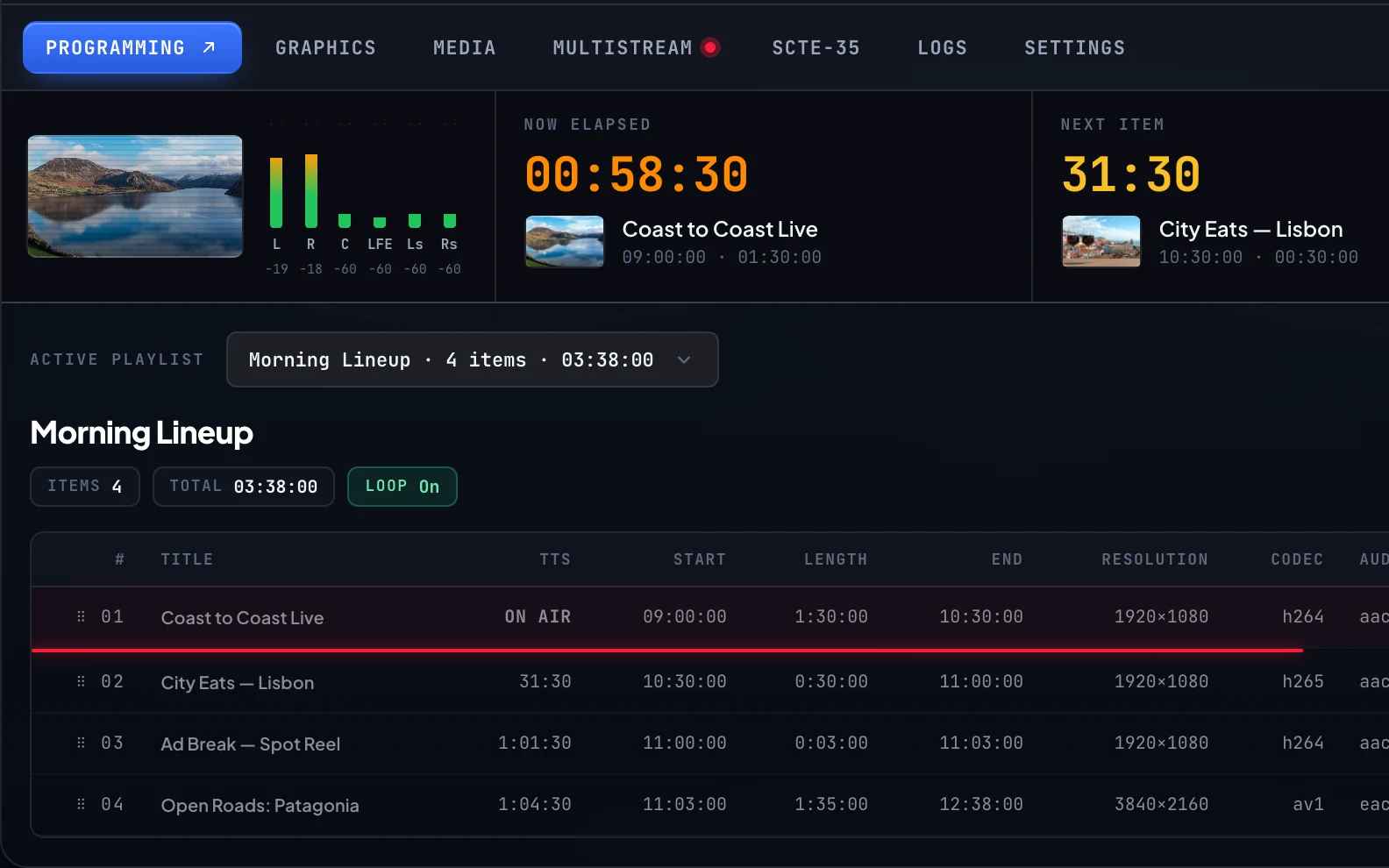
A cloud playout console in a browser: the channel schedule on the left, the on-air preview and graphics controls on the right
Definition

Playout first, then the cloud part

Playout is an old broadcast word for the last thing that happens before a channel leaves the building. Somewhere between the archive and the transmitter, a schedule has to become a single unbroken stream: the 8pm show has to start at 8pm, the logo has to be in the corner, the ad break has to be marked so it can be sold, and the whole thing has to be encoded into something a viewer can receive. The room where that happened was called master control, and it was full of expensive, specific hardware.

Cloud playout is that same chain, running on infrastructure you never see or maintain, driven from a web console. Nothing about the broadcast requirements changed. What changed is that the four jobs below stopped being four purchases plus an integrator, and became a subscription with a login.

That distinction matters when you are comparing products, because plenty of things marketed near this term are not playout. A video host that loops a playlist has no schedule, no graphics, and no ad signalling. A live production switcher needs an operator for as long as the show runs. Playout is the automation that keeps a channel on air for a year without anybody sitting at a desk.

What it does

The four jobs of a playout system

Every playout product, on premise or in the cloud, is some arrangement of these four. When you evaluate vendors, check each one separately, because the gaps are rarely in the first two.

  1. It runs the schedule

    The grid is the channel. Playout plays each item at its slotted time, handles recurring blocks and loops, fills gaps from the library so dead air never reaches a screen, and hands over to a live slot and back without an operator pressing anything.

  2. It renders the graphics

    Logo bug, clock, lower thirds, ticker. Playout composites them into the picture before encoding, which is why they look identical on a smart TV and in VLC. An overlay bolted on in the player is a different thing and a worse one.

  3. It signals the breaks

    Ad breaks are marked in the stream with SCTE-35 cues, frame-accurately, so an ad server or a distributor knows exactly where a commercial can go. Without those markers a channel cannot be monetised by anyone downstream.

  4. It encodes and hands off

    The finished picture is encoded into an adaptive ladder, so each viewer gets the quality their connection carries, and delivered as HLS. This is the point where playout stops and distribution starts.

The comparison

Cloud playout vs traditional playout.

Broadcasters ran racks for decades because racks worked. The argument for the cloud is not that the old way failed, it is that the old way priced a new channel as a capital project before a single show aired.

Up-front cost

Six figures, or a card on file

A traditional chain is an automation system, a video server, a character generator, an encoder, and the integration work to make them agree. Cloud playout is a subscription that starts the month you launch and stops when you do.

Time to air

Months, or the same afternoon

Racking hardware means procurement, shipping, installation, and commissioning. A cloud channel is an account, an upload, and a schedule. Content readiness becomes the only real deadline.

Staffing

A qualified engineer, or nobody

On-premise playout assumes someone in the building who knows the kit and is reachable at 3am. Cloud playout moves that responsibility to the vendor, which is most of why small broadcasters can now run channels at all.

Growth

A second rack, or a second row

Adding a channel on-premise means buying the chain again. In the cloud it is another line on the invoice, which is why operators commonly launch a second channel once the first one is earning.

Upgrades

A capex cycle, or Tuesday

Hardware ages into a replacement project every few years, and new codec support means new boxes. Cloud playout picks up new formats without a maintenance window on your side.

Resilience

What you paid for, or built in

Redundancy on-premise is a second set of everything plus a power and cooling story. In the cloud it is the vendor’s problem, and worth confirming they treat it as one before you sign.

Common mix-ups

Three things cloud playout is not

Not live production software

OBS, vMix, and Wirecast are production tools. Someone operates them, live, for as long as the show is on. Playout is automation that runs a channel around the clock from a schedule with nobody at the desk. The two are complementary rather than competing: a very common setup produces the live show in OBS and sends it into the channel as a live input, so the schedule carries it and picks up again when it ends.

Not a video CDN

A CDN moves finished video to viewers quickly and cheaply. It has no opinion about what airs at 8pm. Playout produces the thing the CDN carries. You need both, and the interesting question is whether your playout vendor charges separately for the delivery half. Ours does not, which is covered on the delivery page.

Not the same as a FAST channel

FAST describes a business model: a free channel supported by advertising, distributed through platforms like Samsung TV Plus or Pluto. Cloud playout is the machinery that makes such a channel exist. Every FAST channel needs playout; not every channel built on playout is FAST. If the ad-supported model is the goal, start at FAST and linear TV.

Budgeting

What actually drives the cost.

Three variables explain almost every quote you will receive. Our own numbers are on the cloud playout pricing page, and there is a longer breakdown of the whole budget in what a TV channel costs.

Channels

Channel count, first and mostly

Playout is priced per channel almost everywhere, because each channel is a continuously running encode. One channel at high quality costs less than three at low quality.

Quality

Resolution, frame rate, codec

A 1080p59.94 sports channel is meaningfully more expensive to encode than a 720p29.97 talk channel, and how many rungs the adaptive ladder carries moves the number again.

Delivery

Bandwidth, if it is metered

This is where quoted prices come apart. Delivery is billed per gigabyte by most vendors, so a channel that finds an audience gets a bill that grows with it. Ours includes delivery, which is the whole point of a flat price.

Before you sign

Five things worth checking

1. Is the price published?

A vendor who will not put a number on a page is reserving the right to price you by how much they think you can pay. It also means every comparison you attempt takes a sales call. We publish ours, and the reason is not generosity: it is that the flat number holds up next to metered competitors, so hiding it would cost us. See how we compare to Amagi and to Muvi.

2. Is delivery included or metered?

This is the single most common surprise on a playout invoice. A subscription that looks cheap next to ours often bills bandwidth separately, which means the bill scales with your success and you cannot forecast it until the audience arrives. Ask for the per-gigabyte rate and model it at ten times your current viewership before you decide anything.

3. Does it carry real SCTE-35?

Plenty of platforms will insert an ad. Far fewer emit standards-compliant SCTE-35 markers that survive to a distributor and let a third-party ad server fill the break. If there is any chance of a FAST platform deal later, this is the feature that decides whether you have to migrate first. Detail on the SCTE-35 page.

4. What is the contract length?

Annual commitments are the norm in this category, usually because the vendor knows the first three months are the ones you might walk away in. Month to month with no contract is a harder promise to make and a better one to receive.

5. What happens when a file is bad at 3am?

This is the question that separates broadcast software from video software. Ask specifically: what airs when a schedule has a gap, what happens when a file fails to decode mid-item, and what happens when a live feed drops. The answers should be auto-fill from the library, skip to the next item, and fall back to the schedule, all without a phone call. Then ask whether there is an as-run log, because without one you cannot prove to an advertiser what aired.

See it running

That is the category. If you want the specifics of how we do it, the graphics kit, the codec support, and the plan-by-plan detail are on the product page, and a channel can be live the same day your content is.

See how we do it
Questions

Cloud playout, answered.

What does playout mean in broadcasting?

Playout is the final stage of a television channel, where a schedule becomes a single continuous stream. It plays each programme at its slotted time, renders the on-screen graphics, marks the ad breaks, and hands one finished feed to whatever carries it to viewers. In a traditional broadcaster this was a room full of hardware called master control.

What is the difference between playout and streaming?

Playout creates the channel; streaming delivers it. Playout decides what airs at 8pm and what it looks like. Streaming is the transport that carries the finished feed to a phone or a TV. A streaming platform with no playout gives you a video player and nothing to schedule into it.

Do I need a playout system for a FAST channel?

Yes. A FAST channel is a linear channel by definition, which means something has to run the schedule 24/7. Distributors also expect a proper programme guide and clean ad break signalling, both of which come out of playout rather than out of a video host.

Is cloud playout the same as channel-in-a-box?

Channel-in-a-box was the previous step: one server running the automation, graphics, and encoding that used to take four separate devices. Cloud playout takes that same consolidated chain off your premises entirely, so there is no box to buy, rack, cool, or replace in five years.

How much does cloud playout cost?

Priced per channel, typically as a monthly subscription. Our own plans start at $299 per channel per month with delivery included, published on the pricing page. Vendors who will not publish a number usually have an annual commitment and metered bandwidth behind the quote, so compare the yearly total rather than the headline.

Can cloud playout handle live shows as well as recorded ones?

Yes. A live slot in the schedule takes a contribution feed over RTMP, SRT, or RIST and airs it inside the grid like any other item, then returns to the schedule when the show ends. Recorded programming and live shows run on the same channel, in the same guide.

Do I need broadcast experience to run one?

No, and that is most of why small operators can run channels at all now. The broadcast-specific parts, keeping the encode stable, holding frame accuracy on the ad cues, recovering from a bad file, are the vendor's job. What is left is the part you already know: deciding what airs and when. Anyone who can build a weekly schedule in a spreadsheet can build one here.

What happens to the channel if my internet goes down?

Nothing, because the channel is not playing from your building. Cloud playout runs the schedule from the library already uploaded, so your connection only matters when you are uploading media, changing the grid, or feeding a live show.

GET STARTED

Your channel can be live today.

No contract and cancel anytime, with a 7-day money-back guarantee on your first purchase.