FAST & LINEAR TV

Your own TV channel, running 24/7 in the cloud.

Turn a media library into a scheduled, always-on channel with a programme guide, broadcast graphics, and server-side ad breaks. No racks, no master control room, nothing to install. Channels go live the same day.

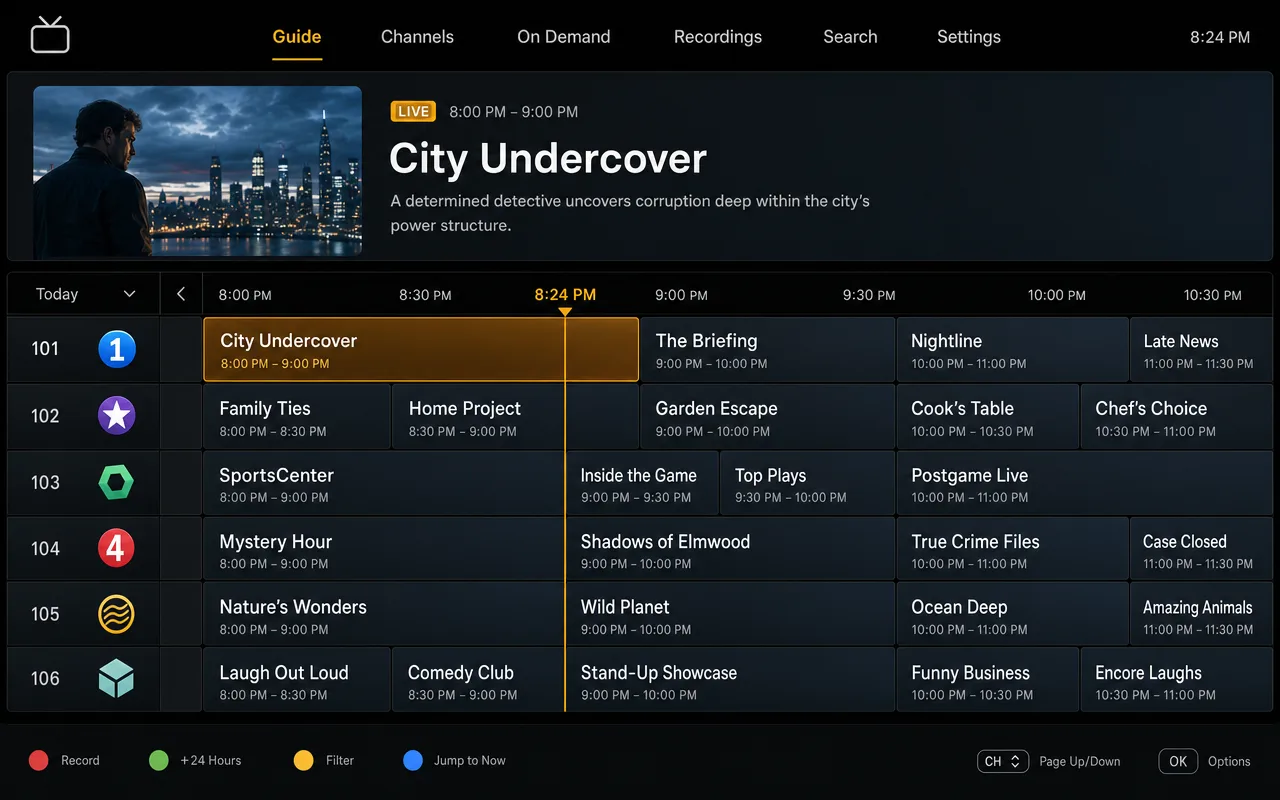
A FAST channel running on LIVEPLUSTV, with the schedule grid and programme guide
Step by step

How to launch a FAST channel

Four steps, all in the browser. Teams with content ready usually have a channel on air the same day.

  1. Upload your library

    Bring your shows in through the browser. Files land in the channel library, where genre, rating, and series metadata feeds the guide and, later, your ad requests.

  2. Build the weekly grid

    Drag shows into a weekly schedule. Recurring blocks handle the daily strips, loops carry the overnight, and auto-fill closes anything you missed. Changes go to air without a render step.

  3. Set graphics and breaks

    Switch on the logo bug, add lower thirds and a ticker if the channel wants them, and drop SCTE-35 markers where the ad breaks belong.

  4. Go live and publish

    The channel starts broadcasting and keeps going 24/7. Your programme guide is published automatically, and the stream is ready for web, mobile, TV casting, and social multistream.

What’s in the box

Everything a linear channel needs.

Playout, guide, graphics, and ad breaks run as one system. You program the channel; the channel takes care of itself.

Schedule

A real programme grid

Weekly drag-and-drop scheduling with recurring blocks, loops, and auto-fill from your library. The grid you build is the grid that airs, and it becomes a published EPG with now/next on screen.

Always on

Never goes dark

If a live input drops or a file misbehaves, the channel falls back to your slate or the next scheduled item and recovers on its own. Viewers get a clean channel instead of a black screen.

Graphics

Broadcast look, no truck

Logo bugs, lower thirds, tickers, and clocks rendered into the stream. Right-to-left and multi-script text works out of the box, so Urdu, Arabic, and Hindi graphics look right the first time.

Ad breaks

SCTE-35 native

Place break markers in the schedule or pass through the cues already in your live feed. Markers travel with the stream frame-accurately, ready for server-side insertion on every plan.

Distribution

One channel, every screen

A web player, mobile playback, casting to TV, and simultaneous multistreaming to social platforms. One schedule feeds all of it.

Library

Your media, organized

Upload once, then tag genre, rating, series, and season, or let AI tagging label new media at upload on higher plans. That metadata drives the programme guide, keeps a large library searchable, and rides along on ad requests so buyers know what they are bidding into.

Use cases

Focused channels win focused audiences.

A niche channel with its own guide keeps people tuned in far longer than a playlist ever will. These are the shapes we see most: faith broadcasting and club sport, diaspora channels in Hindi, Bangla, Urdu, Tamil, Punjabi, Arabic, Afghan and Iranian, rolling news, and a creator library turned into a channel.

Diaspora TV

Home-country TV, wherever home moved to

Communities abroad still want lean-back television in their own language, and a scheduled channel with a guide matches how they already watch. Multi-script graphics handle Urdu, Hindi, and Arabic on screen, overnight loops keep the channel alive across every time zone your audience lives in, and AI subtitles on higher plans let the channel broadcast in its own language while the second generation reads it in English.

Faith

The service live, the ministry all week

Stream the Sunday service live, then run teachings, music, and archive sermons on a schedule the rest of the week. The live slot sits in the same grid as library content, and if the feed from the venue drops, fallback keeps the channel up.

Sports

Match day and everything between

Take fixtures live over SRT from the venue, then fill the week with replays, highlights, and studio shows. SCTE-35 cues in the live feed keep ad breaks clean during stoppages.

Regional news

A newsroom-sized news channel

Run the day’s bulletins on a loop, refresh them as stories develop, and cut to live when something breaks. A ticker carries headlines over everything, and city-level analytics show which markets tune in.

In plain terms

What cloud playout software replaces

Playout is the part of a TV operation that turns a schedule into one continuous broadcast signal. In a traditional channel it lives in a rack: an automation system, video servers, a graphics unit, and an operator keeping watch in master control. That equipment is the main reason launching a channel used to start at six figures.

Cloud playout software does the same job on servers you never see. LIVEPLUSTV runs the whole chain for each channel: it plays your schedule, renders graphics into the picture, carries SCTE-35 ad markers, encodes an adaptive ladder, and hands the stream to a CDN that delivers from 330+ cities. You manage it from a browser, and the cost looks like a software subscription instead of a capital project. The engine has a full page of its own, graphics and codecs included, at Cloud Playout, and plans are on the pricing page.

LIBRARY shows + schedule PLAYOUT SCTE-35 · graphics CDN 330+ cities SCREENS web · mobile · TV one live stream, 24/7
The whole rack, as a browser tab

A channel, or a playlist on repeat?

You can loop a playlist on your own media server and call it a channel. The difference shows up fast. A homemade loop has no guide, so viewers never know what is on next. It has no ad markers, so there is nothing to sell. And it has no fallback, so the first corrupt file stops the loop at 3am. A channel here behaves like television even at its simplest: guide feeds publish as XMLTV and JSON even when the channel just runs a looping playlist rather than a full weekly grid, breaks stay SCTE-35 clean, and playout recovers on its own. That is what platforms and advertisers mean when they say channel.

Ready for carriage from day one

Distribution deals are won commercially, but the technical ask barely varies: a reliable HLS stream and a programme guide feed. Every channel here has both the moment it launches, so when a carriage conversation gets serious, your side of the integration is handing over two URLs.

EVERY CHANNEL INCLUDES
Questions

FAST & linear, answered.

What is a FAST channel?

FAST stands for Free Ad-supported Streaming TV. A FAST channel is a 24/7 linear channel that viewers watch for free, the way they watched cable: programming runs on a schedule, ad breaks pay for it, and the channel sits in a guide next to everything else. You decide what airs and when; advertising covers the bill.

How do I launch a FAST channel?

Upload your library, build a weekly schedule in the browser, place your ad break markers, and start the channel. On LIVEPLUSTV there is no hardware to install and no encoder to configure, so if your content is ready, the channel can be on air the same day.

How much does it cost to run a FAST channel?

Cloud Playout plans start at $254 per month billed yearly, and every plan includes unlimited CDN delivery from 330+ cities, so costs do not climb with your audience. When you monetize, ad serving is billed at $1 per 1,000 delivery-confirmed impressions.

Do I need broadcast hardware?

No. Playout runs in the cloud. You upload your library, build the schedule in a browser, and the channel streams around the clock with no encoders, racks, or master control room on your side.

What happens if my schedule has a gap?

The channel never goes dark. Gaps auto-fill from your library or backup slate, loops and recurring blocks carry the overnight hours, and if a live input drops, playout falls back to the schedule and recovers on its own.

Where can people watch the channel?

On the web player, on mobile, and on TVs via casting, with simultaneous multistreaming to social platforms if you want it. A branded programme guide is published for the channel automatically, with per-show pages and now/next.

Can I get my channel onto FAST platforms?

Carriage deals are commercial conversations, but the technical side is standard: platforms ask for a reliable HLS stream and a programme guide feed. Every LIVEPLUSTV channel has both from day one, including an XMLTV feed, so when a deal lands you hand over URLs and you are done.

What is the difference between FAST and linear TV?

Linear is the umbrella term: any channel where programming runs on a schedule rather than on demand. FAST is a business model on top of it, free to watch and funded by ad breaks. The engine is identical either way, so you can run a FAST channel, an ad-free linear channel, or move between the two without rebuilding anything.

GET STARTED

Your channel can be live today.

No contract and cancel anytime, with a 7-day money-back guarantee on your first purchase.