OTT PLATFORM

Your own streaming service, not a channel on someone else’s.

A branded app, an on-demand library, and subscribers who are yours. Sell subscriptions, rentals, or ad-supported viewing, and deliver it to every screen on an unlimited CDN.

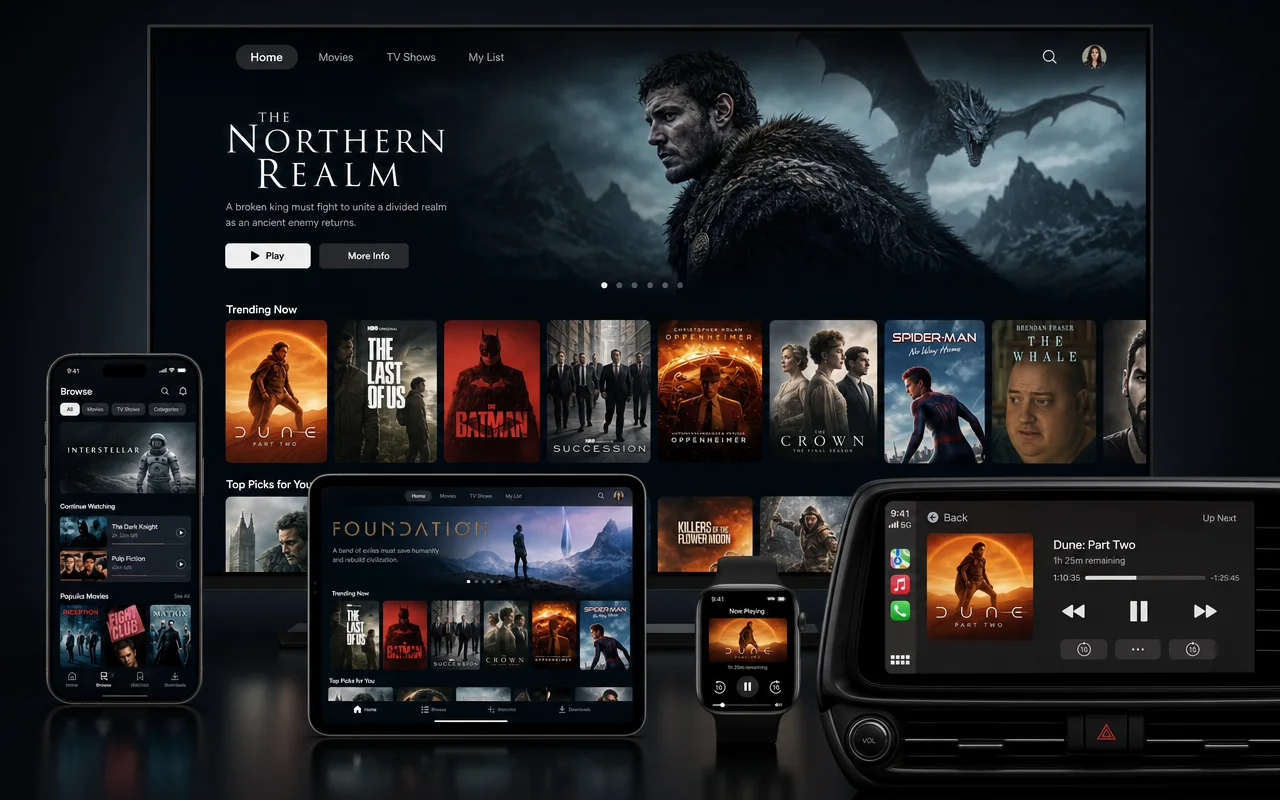
A branded OTT streaming app built on LIVEPLUSTV, with an on-demand library on every screen
Step by step

How to launch your streaming service

Four decisions, all reversible, none requiring an engineering team. The web service can be taking subscribers while the native apps are still in review.

  1. Brand the service

    Your name, your logo, your colors and layout, on your own domain. Viewers sign up to you, not to a marketplace that happens to carry you.

  2. Load the library

    Upload the catalog, organize it into collections, and embed your live channel beside the on-demand titles so the service covers both ways people watch.

  3. Choose how it earns

    A subscription plan to start; rentals, pay-per-view, ads, and hybrid models as you grow into them. Prices are yours to set and revenue is yours to keep.

  4. Launch on every screen

    The branded web player and TV casting work from day one. Add native mobile and TV apps under your own app-store accounts when you are ready.

What’s in the box

Everything a streaming service is made of.

Every model runs on the same library and the same apps, and you can sell more than one at once. The plan-by-plan mapping is on the OTT pricing table.

Your brand

Your name on the app

A branded streaming app on web and mobile with a custom domain, your logo, and your layout. The storefront is yours, not a channel page inside someone else’s service.

Library

A real on-demand catalog

Upload, organize into collections, and manage metadata at scale. Your live channel embeds beside the VOD titles, so one service covers appointment viewing and binge viewing.

Monetization

Subscriptions, PPV, ads, or all three

SVOD plans, rentals and pay-per-view, and ad-supported viewing with server-side insertion. Mix models on higher plans, with free trials, coupons, and gift subscriptions to grow on.

Experience

Feels like the big services

Continue watching, watchlists, recommendations, cloud DVR, multi-audio and subtitles, and personalized profiles and 4K on higher plans. Viewers should not feel a difference from the apps they already use.

Protection

Studio-grade content security

Signed URLs on every plan, studio DRM (Widevine, FairPlay, PlayReady) from Network, and geo-blocking, concurrent-stream limits, and forensic watermarking as rights demand it.

Ownership

Your audience stays yours

Apps publish under your store accounts, subscribers are your customers, and audience and revenue data is yours to export. Build the asset once, own it permanently.

YOUR CONTENT VOD + live channel YOUR SERVICE brand · paywall · apps WEB MOBILE APPS TV APPS
One service · one subscriber base · every screen
Which one

Start a streaming service, or a TV channel?

They are different businesses. A streaming service is on demand and direct: viewers pay you, or watch ads inside your app, and the library is the product. A FAST or linear channel is scheduled and lean-back: free to watch, funded by ad breaks, built for reach. The economics follow. A service earns more per viewer from far fewer viewers; a channel earns less per viewer from many more of them.

The honest answer for most content owners is eventually both. Launch the FAST channel for reach and discovery, run the OTT service for the audience that wants everything on demand, and embed the live channel inside the app so each one feeds the other. The two products share your library, your analytics, and your ad pipeline, so the second launch is much smaller than the first.

The app-store question

The web service is live as soon as you are, on your domain, with casting to the living-room TV built in. Native mobile and TV apps are an add-on, built per platform and published under your own app-store accounts, which means store review timelines apply but the listing, the ratings, and the installs belong to you. Start on web, add the storefronts that earn their keep.

Own the platform, not just the content

Publishing to social platforms rents an audience: the platform owns the relationship, sets the rules, and takes the margin. Your service inverts that. Sign-ups land in your subscriber list, pricing is your decision, and the data exports whenever you ask. Protection scales with the rights involved, from signed URLs on every plan up to studio DRM, territory rules, and forensic watermarking. It is the difference between building a following and building an asset.

EVERY PLAN INCLUDES
Questions

OTT, answered.

What is an OTT platform?

OTT (over-the-top) means video delivered over the open internet instead of cable or satellite. An OTT platform is the software behind your own streaming service: the branded apps viewers open, the library behind them, the subscriptions or ads that pay for it, and the delivery that gets video to every screen. Netflix is an OTT service; this is the platform for running yours.

How is this different from a FAST or linear channel?

Cloud Playout runs a scheduled 24/7 channel. The OTT Platform is your own on-demand service with a branded app, a library, and subscribers. Many operators run both, and your live channel can be embedded inside the service, so viewers get lean-back and on-demand in one place.

How do I make money from it?

Sell subscriptions, rent or sell individual titles, run ads through server-side insertion, or mix all three on higher plans. Free trials, coupons, and gift subscriptions are available as you move up tiers. You set the prices and keep your revenue.

Do I own my apps, subscribers, and data?

Yes. Native apps publish under your own app-store accounts, the subscriber relationship is yours, and viewer and revenue data is yours to keep and export. Nothing about the audience you build is locked to us.

How is my content protected?

Every plan protects streams with signed URLs and tokens. Premium adds geo-blocking and territory rules, and Network adds studio DRM (Widevine, FairPlay, PlayReady), concurrent-stream limits and forensic watermarking for content that rights holders worry about.

What devices can viewers watch on?

The branded web player works on desktop and mobile from day one, with casting to TV via Chromecast and AirPlay. Native mobile apps (iOS and Android) and TV apps (Roku, Fire TV, Apple TV, Android TV) are available as add-ons, published under your own store accounts.

What does the viewing experience include?

The things viewers now expect from the big services: continue watching, watchlists, recommendations, cloud DVR with catch-up and start-over, multiple audio tracks and subtitles, and personalized profiles and 4K on higher plans.

What does it cost?

Plans start at $127 per month billed yearly, priced per streaming service, with unlimited CDN bandwidth on every plan. Native mobile and TV apps are a per-app add-on. The full tier matrix is on the OTT pricing page.

GET STARTED

Your channel can be live today.

No contract and cancel anytime, with a 7-day money-back guarantee on your first purchase.