ANALYTICS

TV channel analytics, down to the city and the second.

Measurement happens at the delivery edge, so every stream on every device is counted with no SDK in the player. Real-time viewers, a city-level world map, playback quality, and ad numbers you can invoice from.

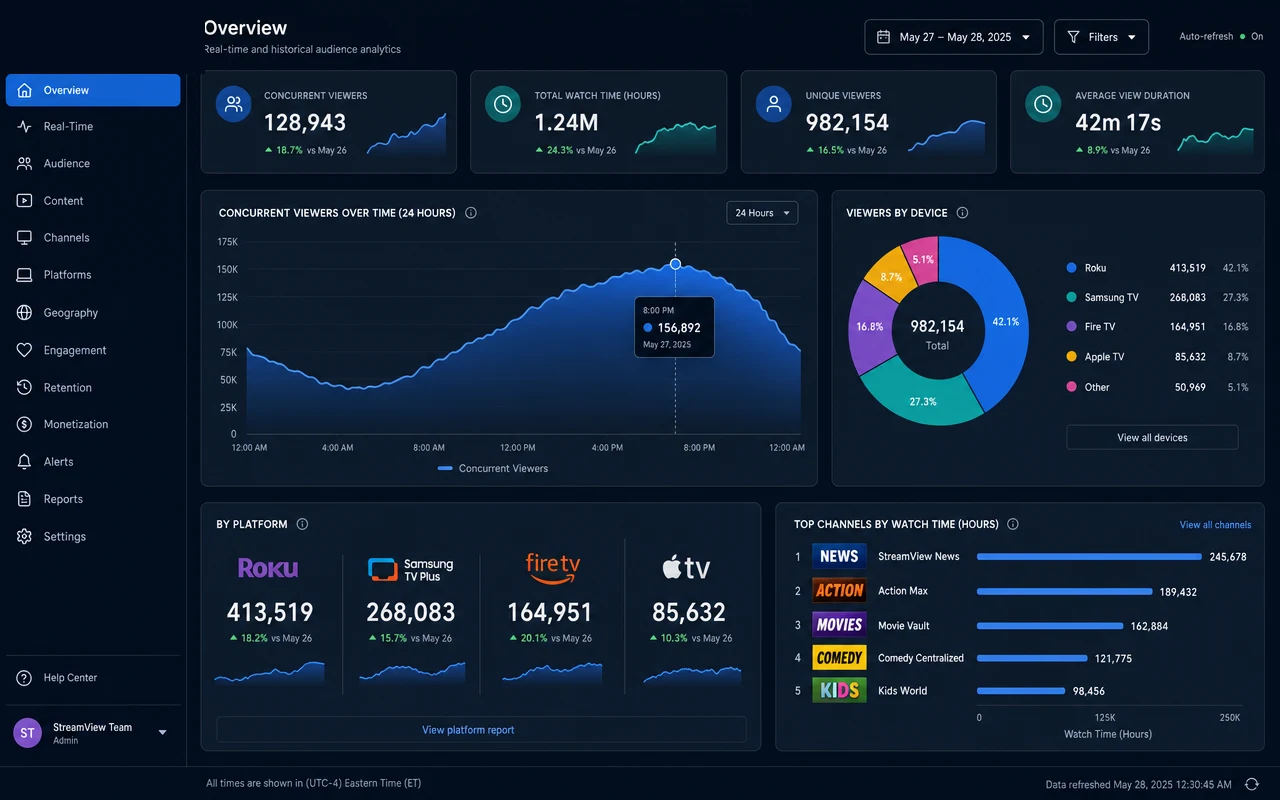
The LIVEPLUSTV analytics dashboard: real-time viewers and a city-level world map
How it works

How server-side measurement works

The delivery infrastructure already sees every stream it serves. Analytics is that record, organized.

  1. The player fetches segments

    Every viewer on every device plays your channel by requesting HLS segments from the CDN edge. That request stream is the raw material; no cooperation from the player is needed.

  2. The edge counts the session

    Requests are grouped into viewing sessions using rotating identifiers and coarse, city-level geography. No cookies, no fingerprinting, no script running on the device.

  3. Aggregates hit your dashboard

    Concurrent viewers, watch time, devices, and geography roll up per channel in real time. The spike shows while the match is still on, not in tomorrow’s report.

  4. Ad plays are confirmed

    When an ad is fetched for playback, the impression is logged. The same events power your revenue reporting and the $1 CPM serving bill, so billing and reporting can never disagree.

What you see

Audience, quality, and revenue in one view.

Built into the dashboard for every channel, from the first viewer onward.

Server-side

Every stream counts

Measured at the delivery edge instead of inside a player SDK. Direct HLS links, TV apps, and embeds all show up, and ad blockers change nothing.

Real-time

Watch the audience arrive

Live concurrent viewers and session activity as the show airs. You see the audience build through the first half, dip at the break, and return.

Geography

A world map of your viewers

Country and city-level audience on an interactive map. A diaspora channel can watch the same show land in Toronto, Dubai, and Birmingham at once.

Devices

Every screen, broken down

Device, player, and network mix per channel, so you know whether the audience is on phones at lunch or TVs in the evening, and can schedule accordingly.

Quality

QoE next to audience

Startup time, rebuffer ratio, and errors alongside viewership. When a number dips, you can tell whether the show flopped or the stream struggled.

Proof

As-run and ad reporting

What played, when it played, and what it earned. Impression and revenue reporting backed by as-run logs an advertiser can be shown.

Explainer

Server-side vs client-side analytics

The standard way to measure streaming is a JavaScript snippet or a player plugin that phones home. It undercounts by design. A plugin cannot see a plain HLS URL opened in VLC, a feed playing inside a distributor’s app, or any player you never shipped code to. Script blockers take another bite, and each new platform means another integration to build and keep working.

Measuring at the delivery edge turns that around. Anything that plays the stream had to fetch segments from the CDN, so everything that plays gets counted, whatever the player was. One measurement point covers the web player, TV apps, embeds, and raw stream links, and the numbers cannot be blocked on the client because nothing runs on the client.

EVERY PLAYER TV apps · web · VLC CDN EDGE sessions counted here DASHBOARD real time HLS segment requests aggregates
No SDK anywhere · the delivery itself is the meter

What this means for privacy

Edge measurement needs no cookies and builds no profiles. Sessions are counted with rotating identifiers, geography stays coarse, and the result is audience measurement rather than surveillance. You learn how many people in a given city watched the evening show, and nothing about who they were.

Proof

Numbers you can put on an invoice

Audience claims get tested the moment money is involved: an advertiser audit, a carriage negotiation, a billing dispute. Delivery-side numbers hold up under that pressure because they come from the same records that served the stream. As-run logs of what aired, delivery-confirmed ad impressions, and per-channel revenue reporting are one pipeline, not three tools glued together. The same numbers price your inventory, which is how ad monetization pays for the channel.

Quality sits in the same view. Startup time, rebuffering, and playback errors per channel mean that when viewership dips, you can tell a content problem from a delivery problem before anyone has to guess.

ON EVERY PLAN
Questions

Analytics, answered.

Do I need to add a tracking SDK to my player?

No. Measurement happens server-side at the delivery edge, so every stream is counted, including plain HLS links opened in VLC and playback inside smart-TV apps. There is no player integration to build and nothing for viewers to block.

What can I see about my audience?

Real-time and historical viewers, watch time, geography down to city level on a world map, device and player breakdowns, and network mix, all per channel.

Why don’t my numbers match Google Analytics?

Web analytics scripts measure page loads in a browser, only where the script runs and only when consent allows it. Edge measurement counts the streams themselves, on every surface, whether or not a web page was involved. It routinely sees audiences a page-based tool cannot.

Is viewer privacy respected?

Yes. Analytics are aggregate. Sessions are counted with rotating identifiers and coarse geography rather than personal profiles, there are no tracking cookies, and the whole approach is disclosed in our privacy policy.

Can I see how the stream performed, not just who watched?

Yes. Quality-of-experience metrics such as startup time, rebuffering, and playback errors sit alongside the audience numbers, so a bad night can be traced to the content or to the delivery, whichever it was.

What about ad reporting?

Monetized channels get impression, fill, and revenue reporting backed by as-run records of what played and when. Impressions are delivery-confirmed, meaning the ad was fetched for playback by a real player, and those are the numbers you bill advertisers against.

Do embeds and third-party players get counted?

Yes. Anything that plays the stream fetches segments from the edge, so embeds on other sites, playback inside distributor apps, and plain stream links all land in the same dashboard as your own player. If it played, it counted.

Does measurement affect playback?

No. Nothing extra runs on the viewer’s device and nothing is injected into the stream. Measurement reads the delivery records the CDN already produces, so being counted costs the viewer exactly nothing.

GET STARTED

Your channel can be live today.

No contract and cancel anytime, with a 7-day money-back guarantee on your first purchase.